


The New F5CAB5 2026 Updated Verified Study Guides & Best Courses
Authentic F5CAB5 Exam Dumps PDF - 2026 Updated
NEW QUESTION # 15
A custom HTTP monitor is failing to a pool member 10.10.3.75:8080 that serves up www.example.com. A ping works to the pool member address. The SEND string is:
GET / HTTP/1.1 \r\nHost: www.example.com\r\nConnection: Close\r\n\r\n.
Which CLI tool syntax will show whether the web server returns the correct HTTP response?
- A. curl --header 'Host: www.example.com' 'http://10.10.3.75:8080/'
- B. curl http://10.10.3.75:8080/www.example.com/index.html
- C. tracepath 10.10.3.75 8080 GET /index
- D. tracepath http://www.example.com:80
Answer: A
Explanation:
To manually verify a health monitor's "Send String" from the BIG-IP command line, the curl utility is the preferred tool because it allows for custom header insertion.
Matching the Monitor String: The monitor string requires an HTTP/1.1 request which must include a "Host" header. Option A correctly uses the --header (or -H) flag to pass Host:
www.example.com to the specific IP and port of the pool member.
Troubleshooting Logic: If curl--header 'Host: www.example.com' 'http://10.10.3.75:8080/' returns a
"200 OK" but the BIG-IP monitor still shows "Down," the administrator should check if the Receive String in the monitor configuration matches the output provided by curl.
NEW QUESTION # 16
A device group is currently in theChanges Pendingsync status. How can the BIG-IP Administrator determine which member of the device group has the most recent configuration? (Choose one answer)
- A. Device Management > Device Groups
- B. Device Management > Overview
- C. System > High Availability
- D. Device Management > Devices
Answer: A
Explanation:
When a BIG-IP device group shows a Changes Pending status, it indicates that one or more devices in the group have configuration changes that have not yet been synchronized to the other members. To identifywhich device has the most recent (authoritative) configuration, the administrator must view the detailed synchronization status at thedevice group level.
The correct location is Device Management > Device Groups (Option D). Within this menu, the BIG-IP Configuration Utility displays each device group along with its synchronization status and provides details about which device has pending changes. From this view, the administrator can clearly see which device is marked as havingchanges pending, making it the source device that should be used to initiate a Sync to Groupoperation.
NEW QUESTION # 17
Which two methods should the BIG-IP Administrator troubleshoot a Pool-member that's been marked "DOWN" by its Health Monitor? (Pick the 2 correct responses below)
- A. Review the BIG-IP's routing table using "netstat -rn" to show all routes.
- B. Enable Monitor Logging for the Pool-member that's "DOWN".
- C. Review the Pool & Pool-member Statistics table for error data.
- D. Collect a TCPdump packet capture for the "DOWN" Pool-member.
Answer: B,D
Explanation:
When a health monitor marks a member "Down," the goal is to determine if the issue is at the network level or the application level.
Monitor Logging (Option A): In the Pool Member configuration, an administrator can enable "Monitor Logging". This generates a detailed text file in /var/log/monitors/ that shows the exact "Send" string sent by the BIG-IP and the exact "Receive" string (or lack thereof) returned by the server.
TCPdump (Option C): This is the most definitive way to see if the monitor traffic is even leaving the BIG-IP and if the server is responding with a TCP RST (reset) or an ICMP unreachable message. A command such as tcpdump -ni <vlan> host <member_ip> and port <member_port> is standard for this task.
Why not others? While the routing table (Option B) is useful for general connectivity, if other members in the same subnet are "Up," the routing is likely fine. Statistics (Option D) show that it is down but rarely why it is down at a protocol level.
NEW QUESTION # 18
Refer to the exhibit.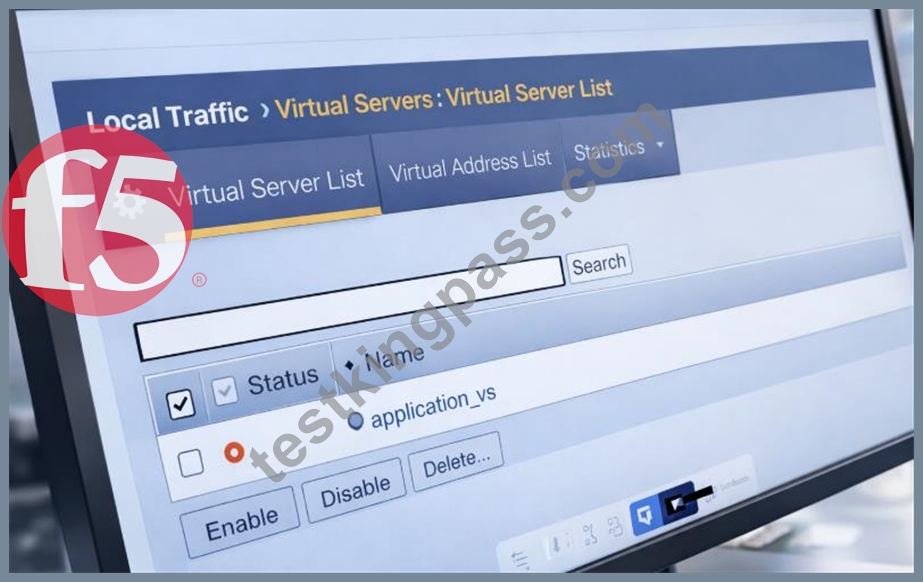
The image shows the status of a virtual server named application_vs in the BIG-IP Configuration Utility.
What is the cause of the status shown? (Choose two answers)
- A. Virtual Server administratively disabled
- B. Pool member(s) administratively disabled
- C. Node(s) administratively disabled
- D. Pool member(s) forced offline
Answer: B,C
Explanation:
The exhibit shows the virtual server application_vs with a status indicating it is offline but enabled. In BIG-IP terminology, this status means the virtual server itself is administratively enabled, but it is unable to pass traffic because no usable pool members are available.
Two common and documented causes for this condition are:
Pool member(s) administratively disabled (Option A):
When all pool members are administratively disabled, BIG-IP removes them from load-balancing decisions. Even though the virtual server remains enabled, it has no available pool members to send traffic to, resulting in an offline status.
Node(s) administratively disabled (Option C):
Pool members inherit the status of their parent nodes. If a node is administratively disabled, all associated pool members are also marked unavailable. This condition causes the virtual server to show as offline, even though the virtual server configuration itself is correct.
The other options are incorrect:
Forced offline pool members (Option B) result in a different operational intent and are explicitly set for maintenance scenarios.
Virtual server administratively disabled (Option D) would show the virtual server as disabled, not enabled/offline.
This behavior is consistent with BIG-IP traffic management logic and is commonly verified by reviewing pool and node availability states when diagnosing virtual server availability issues.
NEW QUESTION # 19
A set of servers is used for an FTP application as well as an HTTP website via separate BIG-IP Pools. The server support team reports that some servers are receiving a lot more traffic than others. Which Load Balancing Method should the BIG-IP Administrator apply to even out the connection count?
- A. Least Connections (Node)
- B. Ratio (Member)
- C. Least Connections (Member)
- D. Ratio (Node)
Answer: A
Explanation:
When load balancing is not working as expected across hardware hosting multiple services, the administrator must distinguish between "member" and "node" level algorithms. A "member" is a specific IP and port (e.g., 10.1.1.1:80), while a "node" is the physical server's IP (10.1.1.1) regardless of the port. If servers host both FTP and HTTP services in separate pools, using
"Least Connections (Member)" only balances connections within each individual pool. This can lead to a skewed distribution where one server is selected for a new HTTP connection because it has the fewest HTTP connections, even if it is currently overloaded with hundreds of FTP connections. By applying "Least Connections (Node)," the BIG-IP tracks the total number of connections to the physical hardware across all ports and pools. This ensures that the administrator can maintain an even distribution of the total workload across the server fleet, resolving the reports of uneven traffic distribution reported by the server support team.
NEW QUESTION # 20
Refer to the exhibit.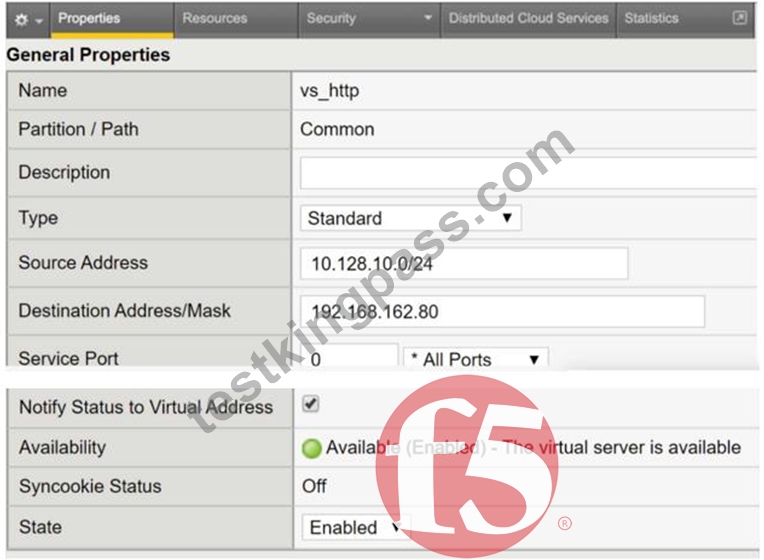
A user with IP address 192.168.162.70 is unable to connect to an HTTP application. What is a possible cause within the Virtual Server configuration?
- A. The Service Port is configured as 0 *All Ports
- B. The Virtual Server is configured as a Standard Type
- C. The Source Address is configured as 10.128.10.0/24
- D. The Destination Address is configured as 192.168.162.80
Answer: C
Explanation:
The failure to connect is caused by a restrictive Source Address filter configured on the Virtual Server.
Source Address Filtering: In the BIG-IP system, the Source Address field on a Virtual Server acts as an implicit Access Control List (ACL). Only traffic originating from a client IP address that matches the specified network range will be accepted and processed by the Virtual Server.
Analyzing the Exhibit: The provided configuration for vs_http shows the Source Address is set to 10.128.10.0/24. This means the Virtual Server will only accept connections from the subnet ranging from 10.128.10.1 to 10.128.10.254.
Identifying the Conflict: The user trying to connect has the IP address 192.168.162.70. Since 192.168.162.70 does not fall within the allowed 10.128.10.0/24 range, the BIG-IP system will not match this traffic to the Virtual Server, effectively blocking the connection attempt.
Evaluation of Other Options:
All Ports (Option A): Configuring a Virtual Server for "All Ports" (port 0) allows it to handle traffic for any destination port, which would not block a standard HTTP application.
Destination Address (Option B): The destination address 192.168.162.80 is the Virtual IP (VIP) users should be connecting to; this is a standard configuration and not the cause of the failure for a user reaching out to it.
Standard Type (Option C): A "Standard" Virtual Server is the most common type used for HTTP applications as it allows for Layer 7 profiles and full proxy capabilities.
NEW QUESTION # 21
The BIG-IP is experiencing issues with data plane resources. Which traffic processing would be most impacted?
- A. APM sessions
- B. MCPD transactions
- C. iControl transactions
- D. Configuration utility
Answer: A
Explanation:
The BIG-IP architecture is divided into two distinct planes: the Control Plane (Management) and the Data Plane (Traffic Management Microkernel - TMM).
Data Plane (TMM): This plane is responsible for the actual processing of application traffic, including load balancing, SSL offloading, and session management for modules like APM (Access Policy Manager). If data plane resources (CPU/Memory allocated to TMM) are exhausted, active user sessions and traffic throughput are directly degraded.
APM Sessions: Because APM sessions are managed within the TMM process to ensure high- speed access control and tunneling, they are a primary "Data Plane" function.
NEW QUESTION # 22
A BIG-IP Administrator needs to collect HTTP status code and HTTP method for traffic flowing through a virtual server.
Which default profile provides this information? (Choose one answer)
- A. HTTP
- B. Analytics
- C. Statistics
- D. Request Adapt
Answer: B
Explanation:
To collect application-layer details such as HTTP status codes (200, 404, 500, etc.) and HTTP methods (GET, POST, PUT, DELETE), the BIG-IP system must use a profile designed for traffic visibility and reporting rather than basic traffic handling. The Analytics profile (Option C) is the correct choice because it is specifically designed to collect, store, and present detailed statistics about HTTP and TCP traffic passing through a virtual server.
When an Analytics profile is attached to a virtual server, BIG-IP can record metrics such as HTTP response codes, request methods, URI paths, latency, throughput, and client-side/server-side performance data. These statistics are then accessible through the BIG-IP GUI under Statistics → Analytics, allowing administrators to validate application behavior and troubleshoot performance or functional issues.
The HTTP profile (Option B) enables HTTP protocol awareness and features like header insertion and compression, but it does not provide historical or statistical reporting of HTTP methods and response codes. Request Adapt (Option A) is used for ICAP-based content adaptation, not visibility. Statistics (Option D) is not a standalone profile and does not provide HTTP-level insight.
Therefore, the Analytics profile is the only default profile that fulfills this requirement.
NEW QUESTION # 23
A BIG-IP Administrator needs to view the CPU utilization of a particular Virtual Server. Which section of the Configuration Utility should the administrator use for this purpose?
- A. Statistics > Module Statistics > Local Traffic > Virtual Servers
- B. Statistics > Module Statistics > Traffic Summary
- C. Statistics > Module Statistics > Local Traffic > Virtual Addresses
- D. Statistics > Analytics > Process CPU Utilization
Answer: A
Explanation:
When a BIG-IP system experiences high overall CPU usage, troubleshooting requires identifying which specific application or service is the primary consumer of resources. While the system-wide performance graphs provide a global view, the granular data necessary to isolate a "top talker" is found in the "Local Traffic" statistics. Navigating to Statistics > Module Statistics > Local Traffic > Virtual Servers allows the administrator to see specific metrics for each configured virtual server, including the number of packets processed, current connections, and critical CPU cycles consumed. This is essential for troubleshooting performance issues where an inefficient iRule, high SSL handshake volume, or complex L7 profiles (like Compression or ASM) might be overtaxing the Traffic Management Microkernel (TMM) for one specific application. By reviewing these basic stats, an administrator can determine if a performance bottle-neck is a system-wide hardware issue or if it is isolated to a single virtual server, enabling targeted remediation such as optimizing iRule logic or moving the high-load virtual server to a dedicated device.
NEW QUESTION # 24
A gateway_icmp health monitor is configured on a pool. The BIG-IP Administrator is investigating why the pool is reported as down while the server is online. Other pools with servers in the same subnet are correctly monitored. What can cause this behavior? (Choose one answer)
- A. The latest patches have not been installed on the server.
- B. The host-based firewall is active on the server.
- C. The admin user is logged on the server.
- D. The HTTP service is not started on the server.
Answer: B
Explanation:
A gateway_icmp monitor checks basic network reachability by sending ICMP echo requests (pings) to the pool member or its gateway. If the pool is marked DOWN while the server is confirmed to be online, the most likely cause is that ICMP traffic is being blocked.
Ahost-based firewall active on the server (Option C)can block ICMP echo requests or replies, preventing BIG-IP from receiving a successful response to the health check. This results in the monitor failing and the pool member being marked down, even though the server and application are otherwise functioning normally. This explanation is consistent with the scenario where other servers in the same subnet work correctly, indicating that routing and BIG-IP configuration are not the issue.
NEW QUESTION # 25
A user wants to use the iHealth Upgrade Advisor to determine any issues with upgrading TMOS. Where can the user generate the QKView to upload to iHealth?
- A. System > Configuration
- B. System > Support
- C. System > Software Management
- D. System > Archives
Answer: B
Explanation:
To utilize the F5 iHealth service, a BIG-IP Administrator must generate a diagnostic snapshot of the system known as a QKView file.
* GUI Path: In the BIG-IP Configuration Utility (GUI), the QKView generation tool is located under System > Support.
* Process: On the Support page, the user selects the "New Support Snapshot" button. From there, they ensure "QKView" is selected. Once the BIG-IP finishes collecting the data (which includes logs, configuration, and hardware statistics), the user can download the resulting .qkview file directly to their local machine.
* iHealth Integration: This file is then uploaded to ihealth.f5.com. The Upgrade Advisor tool within iHealth specifically parses this QKView to check the current configuration against known bugs, hardware limitations, or syntax changes in the target TMOS version.
* Evaluation of Other Options:
* System > Configuration (Option B): This section contains general system settings like DNS, NTP, and SNMP, but does not contain diagnostic tools.
* System > Software Management (Option C): This is where new TMOS images (.iso files) are uploaded and installed, but it is not used for generating diagnostic reports.
* System > Archives (Option D): This is used to create and manage UCS (User Configuration Set) files, which are full system backups. While UCS files contain configuration, they do not contain the deep diagnostic logs and hardware stats required by iHealth for an Upgrade Advisor analysis.
NEW QUESTION # 26
In the BIG-IP Configuration Utility, a user requests a single screen view to determine the status of all Virtual Servers and associated pool members, as well as any iRules in use. Where should the BIG-IP Administrator instruct the user to find this view?32
- A. Local Traffic > Virtual Servers
- B. Local Traffic > Monitors
- C. Statistics
- D. Local Traffic > Network Map
Answer: D
Explanation:
Comprehensive and Detailed Explanation From BIG-IP A41dministration Support and Troubleshooting documents:To confirm functionality across a complex environment, the "Network Map" is the most efficient troubleshooting tool in the Configuration Utility43. It provides a hierarchical, visual representation of the traffic management objects44. A single glance allows the administrator to see the status of a Virtual Server (Green/Red/Yellow), the status of its associated pool, the health of individual pool members, and which iRules are currently attached45. This view is superior to the standard "Virtual Server List" for troubleshooting because it maps the dependencies between objects46. For example, if a Virtual Server is "Red," the Network Map will show if that status is inherited from a failed pool or a specific monitor failing on a pool member.
Reviewing these basic stats in the Network Map helps the administrator quickly isolate whether a failure is at the service level (Virtual Server), the logic level (iRule), or the hardware level (Pool Member).
NEW QUESTION # 27
Some users who connect to a busy Virtual Server have connections reset by the BIG-IP system. Pool member resources are NOT a factor in this behavior. What is a possible cause for this behavior?
- A. The Connection Limit is set too low.
- B. The server SSL Profile has NOT been reconfigured.
- C. The Rewrite Profile has NOT been configured.
- D. The Connection Rate Limit is set too high
Answer: A
Explanation:
Comprehensive and Detailed Explanation From BIG-IP Administration Support and Troubleshooting documents: When troubleshooting intermittent connection resets on a "busy" Virtual Server, the administrator must examine the configured thresholds62. A "Connection Limit" is a hard cap on the number of concurrent connections a Virtual Server or pool member can handle63. If this limit is set too low, the BIG-IP will reset any new connection attempts once the threshold is reached64. The key indicator in this scenario is that the problem only affects "some users" and happens when the server is "busy," suggesting that the system is hitting a capacity ceiling rather than suffering from a persistent configuration error65. Unlike a missing SSL profile, which would likely cause all connections to fail, or a "Connection Rate Limit," which throttles how fast connections arrive, a "Connection Limit" focuses on the total volume66. Identifying this as the cause requires reviewing the Virtual Server's statistics to see if the "Current Connections" count is consistently peaking at the configured limit value.
NEW QUESTION # 28
The BIG-IP Administrator is investigating disk utilization on the BIG-IP device. (Exhibit shows /dev/md4 mounted on / at 100% utilization). What should the BIG-IP Administrator check next?
- A. Large files on the / file system
- B. Results from the platform diagnostics test
- C. Results from the EUD test
- D. Large files on /usr file system
Answer: A
Explanation:
Monitoring resource utilization is essential for maintaining system stability. If the root (/) file system reaches 100% capacity, the BIG-IP may become unresponsive, fail to save configuration changes, or experience daemon crashes83. When the / partition is full, the immediate troubleshooting step is to identify large or unnecessary files-such as old log files, core dumps, or temporary installer files-located specifically within that file system84. In the provided exhibit, /dev/md4 is explicitly listed at 100% usage for the / mount point85. Checking other partitions like /usr (which is at 82% in the exhibit) would not resolve the immediate "Full" status of the root directory86. Administrators often use the du (disk usage) command via the CLI to find the problematic files. Managing disk space is a proactive task; however, when utilization hits 100%, it becomes a reactive troubleshooting emergency that must be resolved to restore the management plane's functionality.
NEW QUESTION # 29
A BIG-IP Administrator suspects that one of the BIG-IP device power supplies is experiencing power outages.
Which log file should the BIG-IP Administrator check to verify the suspicion? (Choose one answer)
- A. /var/log/kern.log
- B. /var/log/audit
- C. /var/log/ltm
- D. /var/log/daemon.log
Answer: C
Explanation:
According to official F5 documentation (K52015891 - Troubleshooting BIG-IP power supply issues), hardware-related alerts for power supplies, fans, and chassis components are logged in /var/log/ltm.
When a BIG-IP device experiences a power supply issue-such as failure, intermittent outages, or fan-related faults-the system generates alerts through internal platform monitoring services. These alerts are written to the /var/log/ltm file and often appear with messages similar to:
Chassis power supply 2 has experienced an issue. Status is as follows: FAN=bad; STATUS=bad.
This makes /var/log/ltm the authoritative log file for identifying and verifying power supply and chassis-related problems on BIG-IP systems.
The other log files are not appropriate for this purpose:
/var/log/daemon.log contains general daemon messages but is not the primary source for chassis hardware alerts.
/var/log/kern.log logs kernel-level events, not platform power status.
/var/log/audit records administrative actions and configuration changes.
Conclusion:
Per F5-supported guidance, when suspecting power supply outages or chassis hardware issues, the BIG-IP Administrator should always check /var/log/ltm first.
NEW QUESTION # 30
A traffic group includes four devices. The failover method is HA order. The failover order is:
* BIGIP-D
* BIGIP-B
* BIGIP-C
* BIGIP-A
Auto fallback is enabled. BIGIP-D has been forced to standby. BIGIP-B was active before being rebooted.
Which device is active when BIGIP-B is up after the reboot?
- A. BIGIP-B
- B. BIGIP-D
- C. BIGIP-A
- D. BIGIP-C
Answer: A
Explanation:
To understand which device becomes active, we must look at how the BIG-IP system handles HA Order and Auto Fallback within a traffic group.
* HA Order Mechanism: When a traffic group is configured with an "HA Order" list, the system prefers to host the traffic group on the highest-ranking available device in that list (1 being the highest).
* The Impact of "Forced to Standby": BIGIP-D is the first choice in the order, but it has been "Forced to Standby." This state is persistent and manual; until an administrator releases the "Force to Standby" state, the device is ineligible to host the traffic group, effectively removing it from the top of the preference list.
* Auto Fallback: When "Auto Fallback" is enabled, the traffic group will automatically migrate back to a higher-priority device in the HA order as soon as that device becomes available and is in a healthy
"Standby" state.
* The Scenario Logic: 1. BIGIP-D is ineligible (Forced Offline/Standby).
2. BIGIP-B is the next highest device in the HA Order (Rank 2).
3. While BIGIP-B was rebooting, the traffic group would have failed over to BIGIP-C (Rank 3).
4. Once BIGIP-B finishes booting and joins the cluster in a "Standby" state, the Auto Fallback setting triggers.
5. Because BIGIP-B is higher in the HA Order than the current active device (BIGIP-C) and the only device above it (BIGIP-D) is ineligible, the traffic group fails back to BIGIP-B.
NEW QUESTION # 31
A custom HTTP monitor is failing to a pool member 10.10.3.75:8080 that serves up www.example.com. A ping works to the pool member address. The SEND string is: GET / HTTP/1.1 \r\nHost: www.example.
com\r\nConnection: Close\r\n\r\n. Which CLI tool syntax will show whether the web server returns the correct HTTP response?
- A. curl --header 'Host: www.example.com' 'http://10.10.3.75:8080/'
- B. curl http://10.10.3.75:8080/www.example.com/index.html
- C. tracepath 10.10.3.75 8080 GET /index
- D. tracepath http://www.example.com:80
Answer: A
Explanation:
To manually verify a health monitor's "Send String" from the BIG-IP command line, the curl utility is the preferred tool because it allows for custom header insertion.
* Matching the Monitor String: The monitor string requires an HTTP/1.1 request which must include a
"Host" header. Option A correctly uses the --header (or -H) flag to pass Host: www.example.com to the specific IP and port of the pool member.
* Troubleshooting Logic: If curl --header 'Host: www.example.com' 'http://10.10.3.75:8080/' returns a
"200 OK" but the BIG-IP monitor still shows "Down," the administrator should check if the Receive String in the monitor configuration matches the output provided by curl.
* Invalid Syntax: Option D is incorrect because it tries to append the hostname to the URI path, which the web server will likely reject with a "404 Not Found". tracepath (Options B and C) is a path discovery tool similar to traceroute and cannot validate HTTP response content.
NEW QUESTION # 32
Which Virtual Server type prevents the use of a default pool?
- A. Performance HTTP
- B. Performance (Layer 4)
- C. Standard
- D. Forwarding (IP)
Answer: D
Explanation:
In BIG-IP TMOS administration, the "Forwarding (IP)" virtual server type is unique because it is designed to act as a high-performance router rather than a typical load balancer. Unlike a "Standard" virtual server, which terminates a connection and directs it to a specific pool of members, a Forwarding (IP) virtual server is intended to forward packets based on the system's routing table. Consequently, the configuration for this type of virtual server explicitly removes the option to associate a default pool. If an administrator is troubleshooting a scenario where they cannot assign a pool to a virtual server, they must verify if the type was accidentally set to Forwarding (IP). This type is most commonly used for outbound internet traffic (outbound SNAT) or to allow the BIG-IP to serve as a gateway between internal subnets. Identifying this constraint is vital for troubleshooting configuration errors where an administrator expects the system to load balance traffic but finds the pool association settings are grayed out or unavailable in the Configuration Utility.
NEW QUESTION # 33
Which command verifies configuration syntax?
- A. save sys config
- B. load sys config verify
- C. restart sys service
- D. show sys version
Answer: B
Explanation:
This checks configuration for syntax errors without applying it.
NEW QUESTION # 34
......
F5 F5CAB5 Exam Syllabus Topics:
| Topic | Details |
|---|---|
| Topic 1 |
|
| Topic 2 |
|
| Topic 3 |
|
| Topic 4 |
|
| Topic 5 |
|
| Topic 6 |
|
Get Prepared for Your F5CAB5 Exam With Actual 82 Questions: https://prepaway.testkingpass.com/F5CAB5-testking-dumps.html